Client Reports Portal | Security Guard Reporting Software
Give Your Customers & Non-Security Management Instant Access to Their Own Security “Reports Portal”
Your security guard report recipients shouldn’t have to call, email, or wait for someone at your office to find an old security report for them.
So, while emailed security reports can be scheduled or sent in real-time with this security officer reporting system too, the AccountAbility Client Reports Portal grants anyone to whom you give access their own personal customer-facing database of approved security reports; These reports include but are not limited to Incident Reports, Visitor Management Reports, DAR (Daily Activity Reports), and custom reports. They simply log in, use simple filters to find exactly the report(s) they want, view, and save or print it whenever they want—from wherever they want.
Whether your customer needs yesterday’s Daily Activity Report, last week’s “Light Checks”, or an Incident Report from three years ago, the information is organized and easy to find and sort.
Give your clients the convenience they want, and give yourself fewer report-request phone calls.
Request a DEMO or call (800) 688-9633 to see how the Client Reports Portal can work for your security company.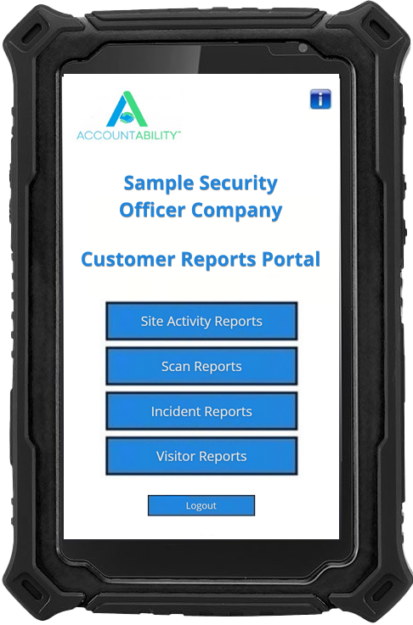
What Is a Client Reports Portal?
A Client Reports Portal is a customer-facing database of selected security report types generated by your security officers and made available to your clients and non-security management if you choose.
Instead of keeping your customers dependent on your office to locate historical reports, you can provide them with their own personalized Reports Portal where they can easily access the reports you’ve made available to them.
This reliable Client Reports Portal can be used for Small Businesses providing services at a single property, medium sized businesses patrolling multiple locations, or globally, for billion-dollar security officer businesses, government agencies, medical facilities, universities, or anywhere physical security is useful.
Your Client Reports Portal user simply logs in and uses straightforward filters to find the report they want.
- No digging through old emails.
- No searching through filing cabinets.
- No calling your office and asking someone to “send me that report from three years ago.”
They just find the report, view it, save it, or print it.
Your Client’s Security Reports at Their Fingertips
Your clients hire you because they want protection, accountability, communication, and confidence that the job is being done.
Professional security reporting is an important part of demonstrating that transparency and value.
The easy Client Reports Portal can give your customers access to the security information you choose to provide, including:
- Daily Activity Reports (DARs)
- Security Officer Shift Reports
- Incident Reports
- Patrol and Guard Tour Activity
- Checkpoint and scan activity
- Visitor Management Reports
- Site activity reports
- Officer activity
- Custom Security Reports
Security reports can be delivered by email, in real time, and/or made available through the customer’s Reports Portal.
A Security Client Reports Portal makes report receipt easier for you and for your clients. Request a DEMO or call (800) 688-9633 today.
They Pull Exactly the Security Reports They Need
The biggest advantage of a customer Reports Portal is simple:
Your client can easily find their own reports.
The portal uses simple filters that allow clients to narrow down their report database and locate the specific information they need.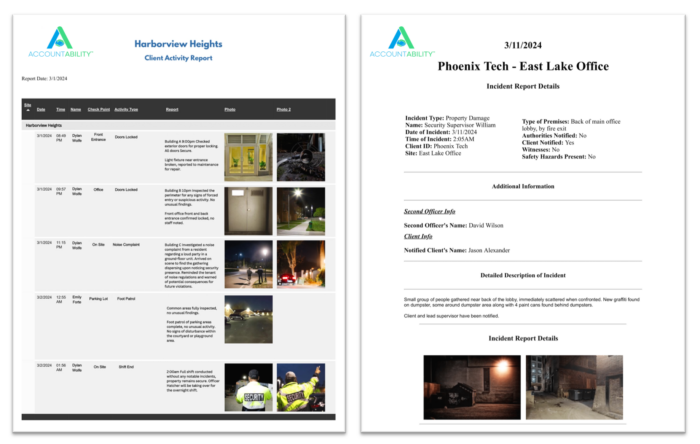
For example, a customer might want to:
- Find all Daily Activity Reports from last month.
- Locate a particular Incident Report.
- Review patrol activity for a specific date range.
- Find reports for one site among many they have with you.
- Review visitor activity.
- Retrieve any report that may be needed for management, insurance, legal, or internal documentation.
Instead of asking your staff to search for the report, your client can easily do it themselves.
That’s the convenience of a self-service security reporting portal.
Access Security Reports From Anywhere
Your security report recipients don’t necessarily work from the same office every day, and many may even work from home. So, client access to security reports should not depend on someone being in a particular location.
The Client Reports Portal gives authorized customers a convenient way to access their available security reports when they need them.
- At the office
- At the property
- At home
- On the road
Your client’s security reports are available through their personalized reports portal from anywhere, according to the access you give them.
Give Every Client Their Own Security Reports Portal
The client-facing Security Reports Portal is Designed Around Your Company’s Reporting Process.
You determine which reports are made available to your clients and how your client reporting system is configured.
You can also use report approval workflows when appropriate, allowing management to review reports before they become available in the Client Reports Portal. The Reports Portal itself is designed as a customer-facing, view & print-only (no editing) reporting environment rather than the administrative Command Center where your security management team controls the system.
This creates an important separation:
- Your management controls the reporting system
- Your customer gets convenient access to the reports you provide
The convenience of this easy Client Reports Portal can’t be beat. Give your clients their own database of reports for easy access without calling you. DEMO or call (800) 688-9633.
Immediately Find Old Security Reports
Think about what happens when a customer emails: “Send me that one Incident Report from last October that had a guy named Bob in it?“
Someone at your company has to find it.
Or: “I need all of our “Door Lock Checks” from last month.“
Someone has to locate them, organize them, and send them.
Or: “Can you resend the patrol report from Tuesday or Thursday of last week? Whichever one mentions that one of the locks was getting rusty?”
Again, someone has to stop what they’re doing and find them.
These requests may seem small—and a little comical unless you’ve received those kind of vague requests before—but they can consume significant administrative time when they happen repeatedly across multiple security report recipients.
A Client Reports Portal turn these requests into customer self-service. Your clients easily grab the reports they need themselves instead of relying on your staff to locate and resend them.
A Modern Way to Deliver Security Guard Reports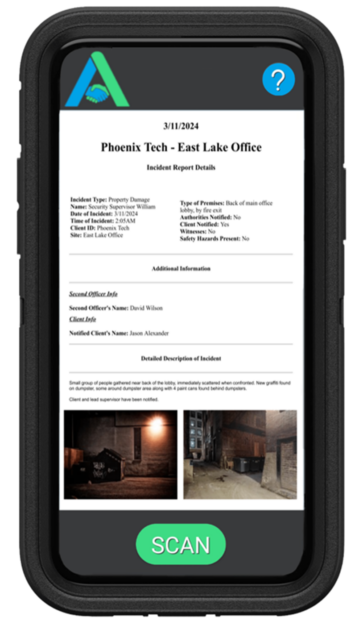
The dependable Security Reports Portal works as part of a broader digital security reporting system.
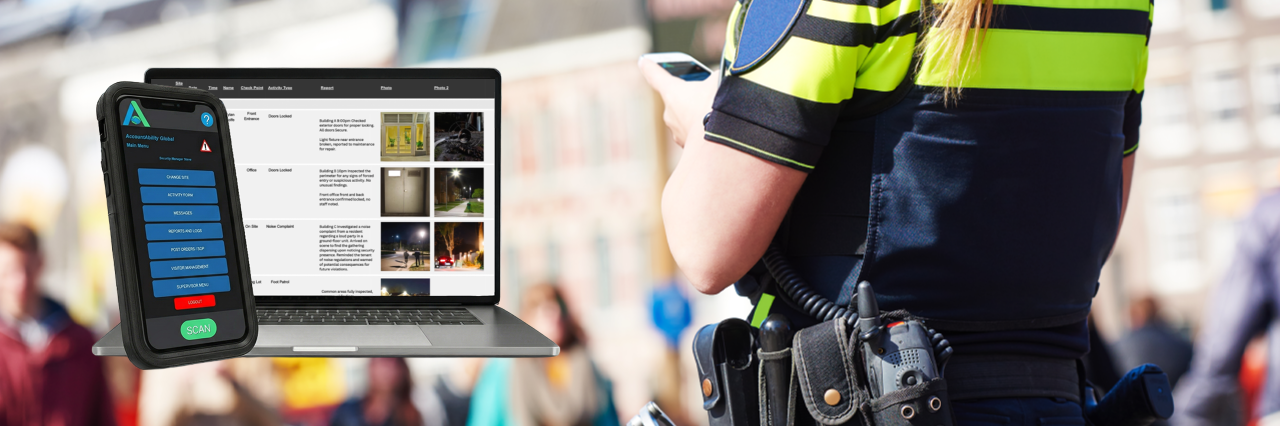
Security officers easily submit activities, scans, incidents reports, and other security reports through the “AccountAbility Mobile” Security Guard App. Those reports can then be reviewed and edited by management through your Command Center, then delivered to recipients through scheduled email reporting, real-time reporting, and/or the customer-facing Reports Portal.
This gives your security operations team multiple ways to keep clients informed.
Scheduled Security Reports
Automatically deliver reports to designated customers at the hour of the day they wish.
Real-Time Security Reports
For reports that need immediate attention, such as Incident Reports, clients can receive information in real time if needed.
Client Reports Portal
Give clients their own centralized place to retrieve the reports they need whenever they need them.
One security reporting system. Multiple ways to keep your customers happy.
Scheduled security reports & real-time reports are available too, but the Client Reports Portal is the BEST way to receive security reports. Call (800) 688-9633 or DEMO.
Professional Security Reporting Keeps Your Client Happy
Your clients aren’t simply paying for the promise that a security officer will be physically present.
They’re paying for your reliable and professional security services—and they need proof that the service is being performed.
Digital security reporting provides this proof through:
- Geotagged Patrol activity
- Checkpoint Scans With Live Pictures
- Time stamped security officer activity
- Daily activities
- Incidents with video
- Site observations
- Visitor Activity
- Inspections
- Any customized security functions
Reports include data such as timestamps, locations, notes, photographs, and other supporting information depending on the report type.
The result is a more transparent relationship between your security team and your client.
- Your customer can see the work being done.
- Your management team can monitor operations and make any corrections.
- And your company has a professional system for delivering the security reports that demonstrates the value of your services.
You Decide What Clients See
A customer-facing Security Reports Portal should provide transparency without giving clients access to your entire administrative system.
That’s why the AccountAbility Guard Management System separates the customer-facing Security Reports Portal from the administrative “Command Center”.
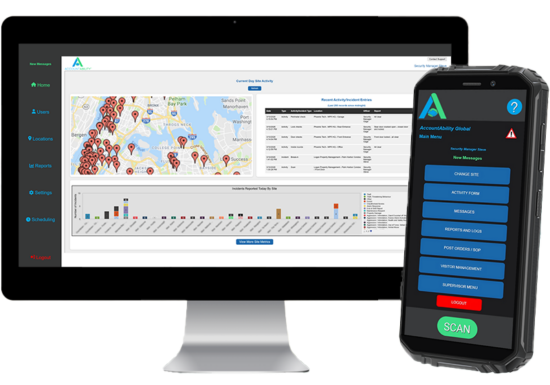
Your management team keeps control over the system, while your clients receive access to the reports and information you choose.
This gives your security operation managers the flexibility to determine:
- Which customers receive Client Reports Portal access
- Who gets scheduled security reports
- Who gets real-time security reports
- Which reports are available
- Which sites or properties are associated with each client
- Whether reports require management approval before customer access
- What information is included in customer-facing reports
- Whether certain location information or other report details are included
Your customers get simplicity. Your company maintains easy control.
Spend less administrative time while providing your clients with the best security reporting method: Their own simple reports database. DEMO or call (800) 688-9633.
Simple Security Reporting for Your Clients
We believe security reporting software shouldn’t require your customers to become software engineers. So, this easy Security Reports Portal is designed around a straightforward concept: Log in. Filter. Get your report.
And because your customers may not use the reports portal every day, AccountAbility includes a simple one-page user manual to help them understand and remember how to use it.
The goal is not to give your customers Another Complicated Software Platform to learn. The goal is to make receipt of their security reports as professional and easy as possible.
Quickly Access Past Security Reports When You Need Them
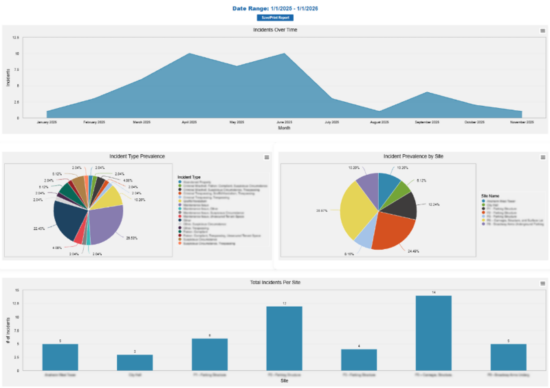
One of the nicest advantages of digital security report storage is the ability to quickly and efficiently retrieve historical data.
A client may need a report today that was generated weeks, months, or even years ago.
With a properly organized digital reporting database, that historical data is so much easier to locate than paper files, old email attachments, or folders on an office computer.
The AccountAbility reliable Client Reports Portal is designed to make historical customer reporting convenient, including the ability to locate older reports using simple filtering and search functions.
Your customer’s reports shouldn’t disappear into a filing cabinet just because they’re old.
 Make Your Security Services More Professional
Your security reporting system is a critical part of your client’s experience with your services.
A client who receives branded, professional, organized, easy-to-access security reports sees something very different—and much better—than a client who receives inconsistent paperwork, scattered email attachments, or handwritten reports.
The AccountAbility Modern Security Reporting System provides branded customer-facing security reports so that your company’s name and identity remain front and center throughout the customer reporting experience.
That matters.
Because professional security reporting doesn’t just document the service you provide. It helps demonstrate the value of the service you provide.
Providing modern security reporting methods is to your advantage. Schedule a DEMO or call (800) 688-9633 today to see for yourself.
Security Client Reports Portal Features:
Customer-Facing Security Reports Database
Give authorized clients a simple login to access their security reports.
Simple Report Filters
Customers can narrow their reports to find the exact information they want without asking your office to search for it.
Historical Report Access
Quickly retrieve older reports when they are needed for management, legal, insurance, or other purposes.
Daily Activity Reports
Provide access to Daily Activity Reports (DAR) and Shift Reports documenting security officer activities and scans.
Incident Reports
Make detailed Incident Reports available to clients through their reliable security reporting portal, including video.
If you use visitor management, customer-facing visitor information can also be made available through the simple Security Client Reports Portal.
Custom Reports
Your security operation works the way that you decide. AccountAbility supports customizable report types and customer reporting requirements.
View, Save & Print
Customers can save or print the security reports they pull.
Management Approval
Reports can be reviewed and approved before being made available to clients.
Branded Client Experience
Present your branded customer reporting system as part of your branded security company’s Security Workforce Management System and service offering.
The Security Client Reports Portal is branded to your business, with your log, all part of your branded and Affordable Guard Reporting System. DEMO or call (800) 688-9633.
Client Reports Portal vs. Sending Every Report by Email
Email is useful. And it is often the method of choice, particularly for those not familiar with the advantages of modern security reporting.
A customer may receive hundreds of emails over the course of a year. Then finding one specific Incident Report or a month’s worth of DAR becomes frustrating.
The simple and reliable security Client Reports Portal provides a better option.
Instead of making your clients inbox the database, give them a dedicated database where their reports can be easily retrieved and saved or printed.
- Email the reports they want automatically.
- Provide real-time reports when appropriate.
- And give them a Client Security Reports Portal for self-service access.
Cover all the bases so your customers can use whichever method makes the most sense for their needs.
Reporting As a Customer-Service Advantage
 A good security reporting system does more than document activity.
It improves the relationship between your security team and your clients.
When clients can easily access their security reports, they don’t have to wonder whether proof exists or wait for someone to retrieve it for them.
The Client Reports Portal is a HUGE convenience.
- Less administrative work for your office
- Faster access to reports for your customers
- Greater reporting transparency
- Better communication with customers
- Easier access to old reports
- A more professional customer experience
- More Proof of the Work Your Security Officers Perform
The result is a reporting process designed not only to make it easier on you and your security management, but for the people who pay for your security services.
Built for Security Clients
AccountAbility was developed specifically around the security industry.
The Security Officer Management Platform supports security guard reporting, Guard Tour & Patrol tracking, Daily Activity Reports, Incident Reports, visitor management, Company Vehicle Inspections, customer reporting, mobile officer reporting, and a WHOLE LOT MORE, all through one integrated system.
This means the Client Reports Portal isn’t an isolated security reports-storage module.
It is part of a much larger security officer management and reporting system designed to connect:
Security Officers → Reports → Management → Customers
- Your security officers collect and submit the information.
- Your management team maintains control.
- Your customers receive the security reports they need.
Give Your Clients Immediate Access To the Reports They Want—When They Want Them
Your clients don’t want to wait for your office to find a report they already paid for.
Grant them the convenience of their own security reporting database; The Client Reports Portal.
With the AccountAbility Client Reports Portal, your customers can use simple filters to find the security reports they need, whenever they need them, from wherever they are.
- Less time drain on your security staff.
- Less waiting for your customers.
- Better reports for everyone.
Ready to Give Your Clients Their Own Security Reports Portal?
See how this reliable Client Reports Portal fits into your security department’s reporting process. Request a DEMO or call (800) 688-9633 today.
Frequently Asked Questions About Client Security Reports Portals:
What is a Client Reports Portal?
A Client Reports Portal is a customer-facing database where authorized clients can access their approved security reports. With AccountAbility, customers use simple filters to locate reports such as Daily Activity Reports, Incident Reports, Guard Patrol Activity, visitor reports, and other customized reports.
What types of security reports can your clients access?
Clients can access Daily Activity Reports, Incident Reports, Shift Reports, Patrol and Checkpoint Activity, Visitor Management Reports, site activity, officer activity, and other custom security reports.
Can customers find old security reports?
Yes. The Reports Portal is designed to allow customers to locate historical security reports using simple filters and search capabilities rather than contacting you every time they need an older report.
Can you control which security reports customers see?
Yes. The customer-facing Reports Portal is separate from the administrative Command Center, and you can decide which reports are approved for your clients.
Can customers print or save their security reports?
Yes. Customer-facing reports can be viewed, saved, or printed as desired.
Can customers receive reports by email too?
Yes. The Client Reports Portal can complement scheduled or real-time security reports. Your client can receive reports by email and also have access to their reporting database for retrieving historical reports.
Is the Reports Portal difficult for customers to use?
No. The Client Reports Portal is designed to be simple, with straightforward filters to sort reports. AccountAbility also provides a one-page user manual for customers.
Does the Reports Portal replace the security company’s management system?
No. The Reports Portal is customer-facing. Your company’s management and administrators continue to use the Command Center to manage, monitor, and control the system, while customers receive access to the reports you make available to them in their Security Reports Portal.